Phone Cleaner Launcher
- 4.5
- Rating
- 50.00K
- Installs
- Free
- Price

 Analysis by App-foxy
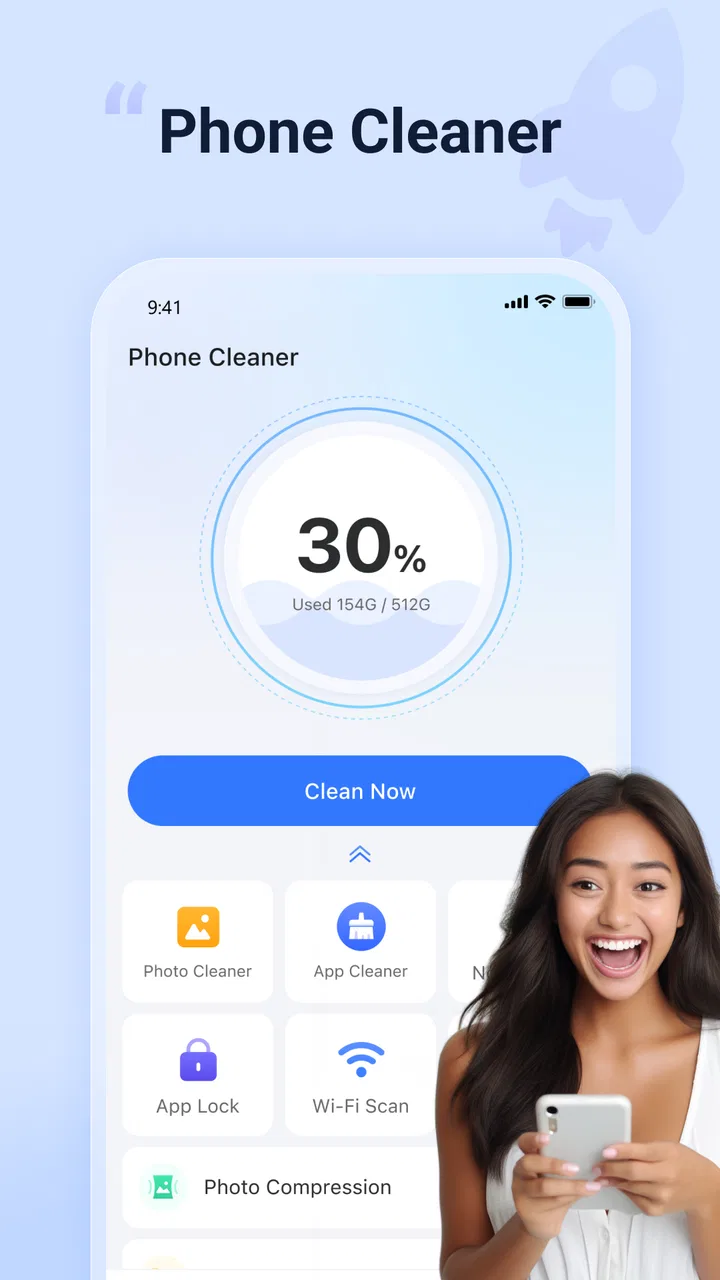
I usually judge a phone-cleaning tool by what it helps me decide, not by how many buttons it puts on the screen. A useful cleaner should make crowded storage easier to understand, reduce the effort of finding disposable files, and avoid turning routine maintenance into a risky guessing game. Phone Cleaner Launcher takes that practical route by bringing junk cleaning, photo and file management, and app locking into one Android utility.
After spending time with it, I see the app as a compact toolbox rather than a complete replacement for every system setting on a phone. Its appeal is simple: instead of opening separate places for storage cleanup, private apps, and media organization, I can begin from one interface. That makes it especially interesting for people who want a straightforward maintenance habit rather than a highly technical storage analyzer.
My short recommendation is this: Phone Cleaner Launcher is worth trying if you want a free, general-purpose cleanup companion for an Android device running version 11 or later. I would be more cautious if you already use the built-in storage tools carefully, need detailed control over every file, or dislike reviewing private content through an additional utility.
You May Also Like

 Pandora - Music & Podcasts
Pandora’s Music Is Easy to Start, but Harder to Recover
Pandora’s strength is its low-effort path from a seed to a station. Its weak spot is how much confidence it asks you to place in connection, setup, and quiet recovery.

 AccuWeather: Weather Radar
AccuWeather Review: A Quick, Clear Forecast for Everyday Decisions
For everyday plans, the best forecast is the one you can understand quickly. AccuWeather makes rain timing, radar, and local conditions easy to act on, with a few trade-offs.

 Hill Climb Racing
Why Hill Climb Racing Still Turns Crashes Into One More Run
A tiny car, a bumpy hill and one more upgrade: Hill Climb Racing keeps resurfacing because its simple chaos makes every near-miss feel personal.

 AliExpress - Shopping App
AliExpress Makes Global Shopping Feel Personal, but Shoppers Bear the Risk
AliExpress turns a global marketplace into a pocket-sized discovery engine. Its reach is useful, its shopping loop compelling, and its trade-offs easy to miss.

 Lords Mobile: Kingdom Wars
Lords Mobile Is a Kingdom-Building Routine, Not a Quick Match
A case-by-case verdict on the building, battles, device demands, and social commitments that make Lords Mobile rewarding for some players and exhausting for others.

 PDF Scanner app - TapScanner
TapScanner Makes Paperwork Easier to Capture, Check, and Share
TapScanner makes scanning with a phone feel less like a rescue operation and more like a dependable step in getting work done. Its capture tools are useful, though not flawless.
More From Our News Desk
View All News


How I would decide whether it belongs on your phone
The first question is not whether a cleaner sounds useful. It is whether your problem is clutter, privacy, or both. Phone Cleaner Launcher covers several related tasks, but those tasks have different risks. Removing unwanted files is one kind of job; deciding which photos matter is another; protecting an app with a lock adds a privacy layer rather than freeing space.
I would consider this app when my phone feels disorganized in several small ways at once. Perhaps the photo library has become difficult to browse, downloads are scattered, and I want selected apps less visible to someone borrowing the device. Handling those needs together can be more convenient than maintaining separate utilities, especially for someone who does not want to learn a complicated file-management system.
The app is listed in the Tools category and comes from XHDeveloper. It is free to use, carries an Everyone age rating, and has reached more than fifty thousand installs. Those details make it approachable for casual users, but they do not remove the need for sensible checking before deleting anything. A cleaner can speed up decisions; it cannot know the personal value of every file.
Its public reception is encouraging without being a reason to install blindly. Phone Cleaner Launcher has a 4.5 average from around 1.7 thousand ratings, alongside 82 written reviews. I read that as a sign that the basic idea works for many people, while still leaving plenty of room for individual differences in phone brands, storage layouts, and expectations.
What I look for before beginning a cleanup
My first step with any cleaner is to identify the actual shortage. If the phone is nearly full, I want to know whether photos, videos, downloads, or app data are responsible. If the problem is only a messy home screen or a private app, deleting files would be the wrong response. This distinction prevents the common mistake of treating every phone problem as “junk.”
I also prefer a review-first workflow. I would not approve a broad cleanup immediately. I would inspect suggested items, open anything that looks personal, and keep anything whose purpose is unclear. This is particularly important with photos, where a duplicate-looking image may be the only copy of a receipt, document, or family moment.
A practical routine is to use the cleaning side when storage pressure is real, then use the photo and file sections for slower organization. The app lock belongs in a separate privacy routine. Combining all three jobs in one hurried session is likely to create confusion, so I would treat each function as its own decision.
How the main tools fit together
The junk-cleaning function is the most obvious starting point. It is designed to help identify material that may no longer be useful, which can be valuable when temporary clutter has accumulated. The important point is that “junk” should be treated as a suggestion category, not an automatic verdict. I would use the scan to narrow my attention, then make the final choice myself.
The photo area is useful for a different reason. Photos are often the largest source of emotional hesitation and storage growth. A tool that brings them into a cleanup workflow can save time, but I would still compare images carefully before removing anything. Similar pictures may differ in focus, framing, or context, and a quick swipe through a group is not always enough.
File management matters when clutter is not limited to the gallery. Downloads, shared documents, old installers, and forgotten attachments can remain invisible during ordinary phone use. Here, the benefit is less about a dramatic one-tap boost and more about making overlooked material easier to notice. I find that a clear review path is more useful than aggressive automation.
The app-lock feature changes the purpose of the utility. It does not clean storage; it helps add a barrier around selected apps. That can be handy on a shared household device or when lending a phone briefly. I would use it selectively, because locking too many apps can make normal use irritating and can turn a quick privacy measure into another layer of friction.
Where Phone Cleaner Launcher feels strongest
Its biggest strength is the combination of related chores. Many people know they should tidy their phone but postpone it because the work is spread across settings, a gallery, a file browser, and privacy controls. Phone Cleaner Launcher gives that person one place to begin. The value is not necessarily that every individual tool is more powerful than a dedicated alternative; it is that the overall routine feels easier to start.
I also like the fit for occasional maintenance. Someone who checks storage only when the phone complains may prefer a visible utility over searching through several system menus. The app can act as a reminder to review clutter before it becomes an emergency. That is a behavioral advantage, and it is easy to underestimate how much convenience affects whether maintenance actually happens.
Another strength is its broad audience. The Everyone rating and free price lower the barrier for families, students, and people using an older compatible Android phone. The current release is version 1.2.6, and the minimum operating-system requirement is Android 11. If the device meets that requirement, the app is positioned as an accessible trial rather than a purchase decision that needs extensive commitment.
For me, the most useful workflow is a staged one. I would begin with files that are obviously disposable, move to photos only after checking the selection method, and configure app locking last. This order keeps storage decisions separate from privacy decisions. It also makes it easier to tell whether the app is genuinely helping or merely presenting many controls at once.
A realistic everyday example
Imagine I am preparing for a trip and my phone is nearly full. I have several folders of screenshots, old downloads, and repeated travel images. Instead of deleting randomly, I could use Phone Cleaner Launcher to bring the likely clutter into view, remove only items I recognize, and then review the photo groups with the trip in mind. I might keep maps, booking confirmations, and duplicate-looking images that are actually useful records.
After that, I could lock a messaging or banking app before lending the phone to a child for entertainment. The two actions solve different problems: cleaning creates room, while locking reduces casual access. That separation is exactly why I would not describe the app as merely a storage booster. Its usefulness comes from joining maintenance and basic privacy in one practical toolkit.
The trade-off is that this scenario still requires attention. The app can organize the review, but I remain responsible for recognizing important files. Anyone expecting a completely hands-off process may find that disappointing. I see it differently: for personal media, a little caution is preferable to an impressive-looking button that makes irreversible choices on my behalf.
Where the usual alternatives may fit better
Android’s built-in storage controls are the natural alternative for users who want the fewest moving parts. System tools are already part of the phone’s settings, so they may feel more trustworthy and less repetitive. If my only goal were checking storage usage or clearing a known category of temporary material, I would first look there.
A dedicated gallery manager may suit someone whose main problem is photos. Such an app can provide a more focused experience for sorting albums, comparing images, and preserving important memories. Phone Cleaner Launcher is more appealing when photo review is only one part of a larger cleanup routine. The choice depends on whether breadth or depth matters more to me.
Likewise, a full file manager may be better for advanced users who need precise folder navigation, renaming, moving, archiving, or manual inspection. Phone Cleaner Launcher is aimed at reducing everyday clutter, not replacing every specialized file operation. If I routinely work with documents and folders, I would want the more detailed tool available even if I also kept this app for quick maintenance.
Privacy-focused users may prefer a dedicated app-lock solution or the security features already supplied by their phone manufacturer. A combined cleaner and lock tool is convenient, but combining functions also means I must be comfortable with one app handling several sensitive areas. For a person who wants strict separation between storage management and privacy protection, separate tools may be the clearer choice.
There is also a philosophical difference between a cleaner and manual maintenance. Manual users spend more time, but they know exactly what they are touching. Phone Cleaner Launcher saves attention by surfacing likely candidates. That is a real benefit for busy people, yet it is not a substitute for judgment. The right option depends on whether I value speed of discovery or maximum control.
Small frictions that affect the decision
The first friction is the possibility of overconfidence. A screen that groups files under a reassuring label can make deletion feel safer than it really is. I would resist selecting everything simply because it appears in a cleanup result. Reviewing categories one by one takes longer, but it protects against losing something that only looks disposable.
The second is the attention cost of an all-in-one design. When cleaning, photo review, file handling, and app locking sit close together, it is easy to keep exploring instead of finishing the original task. I would set a narrow goal before opening the app: free space, organize pictures, or protect selected apps. That simple boundary makes the experience calmer.
App locking can introduce its own inconvenience. If I lock an app that I open constantly, the extra step may outweigh the privacy benefit. I would reserve the feature for apps containing genuinely sensitive information and test the routine before relying on it. Privacy tools are most useful when they are easy enough to keep enabled consistently.
There is also the question of trust. Any utility that helps me inspect personal photos and files deserves the same care I would give a file manager. I would install it from a legitimate app source, read each prompt, and avoid granting more access than the phone requires for the task I am performing. Convenience should not replace basic digital hygiene.
The cost of switching from another cleaner
Moving to Phone Cleaner Launcher is easiest when I currently use no regular maintenance tool. I can establish a simple routine, learn which suggestions I trust, and decide whether the app lock belongs in my daily setup. The transition is less about importing anything and more about changing where I begin when the phone feels crowded.
If I already rely on Android’s own settings, the cost is mainly duplication. I would compare the time saved by having photo, file, and lock functions together against the extra app in my routine. If the built-in tools already solve my needs, installing another cleaner may add clutter rather than remove it.
Switching from a specialized cleaner requires more thought. I would not assume that Phone Cleaner Launcher matches the same depth of scanning or organization. Instead, I would run both approaches cautiously, compare the clarity of their suggestions, and keep the one that makes safe decisions easiest. I would never run multiple cleanup tools aggressively at the same time, because overlapping recommendations can make it harder to understand what changed.
Before changing tools, I would also protect anything important. Backing up irreplaceable photos and documents is sensible regardless of which cleaner I choose. A cleanup app should be part of a maintenance plan, not the only copy of a person’s memories or work files.
Who should install it, and who should skip it
I would recommend Phone Cleaner Launcher to someone who wants one approachable place for junk review, photo and file tidying, and selective app locking. It is a good match for casual Android users who prefer guided organization over manually exploring every folder. It also makes sense for people who repeatedly postpone maintenance because the usual system menus feel scattered.
I would be less enthusiastic for an advanced Android user who already has a precise file-management workflow. If I know exactly where my large files are and prefer manual control, the combined interface may not justify another utility. The same applies if my phone has plenty of free space and I have no interest in an app-lock feature.
I would also skip it as my first choice if photo organization is my only priority. A gallery-focused tool may provide a more specialized experience. Similarly, anyone uncomfortable reviewing personal content through a third-party utility should stay with the phone’s native controls or choose a privacy solution whose purpose is narrower.
My final view after weighing the trade-offs
Phone Cleaner Launcher succeeds when I treat it as a decision aid, not a magic performance switch. Its useful combination of cleanup, photo and file review, and app locking gives it a clear place among general Android tools. The free price makes experimenting easy, and its broad audience positioning means it does not demand a technical mindset.
Its limitations are just as important. The app cannot understand the personal meaning of a photo, and a broad cleaner should not replace careful file review. Users who want deep folder control, a dedicated gallery workflow, or a system-only approach may be happier elsewhere. The best alternative is the one that matches the kind of control I actually want.
For my own use, I would keep the workflow conservative: scan for candidates, inspect before deleting, handle photos separately, and lock only the apps that truly need protection. Used that way, Phone Cleaner Launcher is a sensible free tool for reducing everyday phone clutter without making the process feel like a technical project. If you want convenience with a human check before every important deletion, it is worth trying; if you want total automation or specialist-level control, choose a narrower alternative instead.
FAQs for Phone Cleaner Launcher
01What is Phone Cleaner Launcher and what does it do?
Phone Cleaner Launcher is an Android utility that combines a home-screen launcher with cleaning and optimization tools. After installation, it can help organize app icons, provide quick access to frequently used functions, and scan for items such as cached files, residual data, or unused applications. Its exact features may vary by version, so users should review the permissions and tool descriptions before relying on it for device maintenance.
02Is Phone Cleaner Launcher safe to install and use?
Phone Cleaner Launcher can be useful, but safety depends on downloading it from a trusted source and checking the permissions requested during setup. A launcher may need access to display the home screen, while cleaning features can request broader storage or usage access. Before continuing, review the developer information, privacy policy, recent reviews, and whether the app offers clear explanations for every permission.
03Will Phone Cleaner Launcher really improve my phone’s performance?
The application may free a limited amount of storage by removing temporary files, obsolete packages, or other unnecessary data identified during a scan. However, cleaning apps cannot solve every performance problem, and repeatedly clearing caches may sometimes make applications load more slowly at first. For the best results, combine its tools with uninstalling unused apps, updating Android, and restarting the device when necessary.
04Can Phone Cleaner Launcher delete important files or applications?
Any cleaning tool should be used carefully because automated scans can identify files that appear unnecessary but may still be useful to you. Before confirming a cleanup, check the results list and avoid deleting personal photographs, documents, downloads, or application data unless you are certain they are backed up. If the app includes exclusions, use them for folders or apps that should never be touched.
05Does Phone Cleaner Launcher replace my default home screen, and can I switch back?
Because Phone Cleaner Launcher functions as a launcher, Android may ask you to set it as the default home application. This changes the way your home screen, app drawer, icons, and shortcuts appear, but it does not normally remove your installed apps. If you prefer the previous interface, open Android’s default-app settings, choose the original launcher, and uninstall or disable Phone Cleaner Launcher if appropriate.
Pros
- Quickly removes junk files and cached data.
- Simple interface is easy for first-time users.
- Launcher tools offer fast access to cleaning features.
- Can help free storage space on older devices.
- Useful shortcuts for managing apps and device settings.
Cons
- Cleaning results may vary between Android versions.
- Some features may require intrusive permissions.
- Ads can make the experience feel cluttered.
- Aggressive cleanup may remove files you still need.
- Extra launcher features can consume battery and memory.

Phone Cleaner Launcher
Gallery